
Harnessing Real-Time Clickstream Data: Transforming User Behavior Analytics with Scalable, Adaptive Systems

Behavior analytics isn’t a new concept—companies have long been studying user behavior to enhance customer experiences. The moment you step into a superstore, the strategic arrangement of items in aisles is designed to entice you to buy. The same principle applies to online shopping. They track user behavior from the moment you log in to search for any products.
Traditionally, data from various OLTP databases would be moved to an OLAP database via data pipelines. This data could then be queried and processed later to gain insights into customer behavior and improve operational efficiency. However, this method is slow, making it difficult to provide the real-time feedback needed to tailor customer experiences on the fly.
Here we will see how Expedia designed the system to get clickstream data to capture user interactions on their website in near real time. This data enabled them to deliver personalized, satisfying experiences, improve operational efficiency, gain business intelligence insights, and experiment with innovative product features.
Capturing clickstream data from a website to the backend can be approached in several ways, but one of the most effective methods is streaming messages from client browsers to Kafka via WebSockets. Why WebSockets? Because they enable real-time communication between a web browser and a server. Instead of needing to refresh a webpage to get updated information, you receive updates instantly as they happen. With WebSockets, a single, long-lived connection is maintained, which not only reduces network overhead but also boosts performance compared to traditional HTTP requests.
Expedia conducted a proof of concept by developing a user-friendly interface that allows admins to select specific user events on the Expedia website for tracking. In this interface, the admin simply enters a search criterion—like "user.clicked_event"—and hits the Connect button.
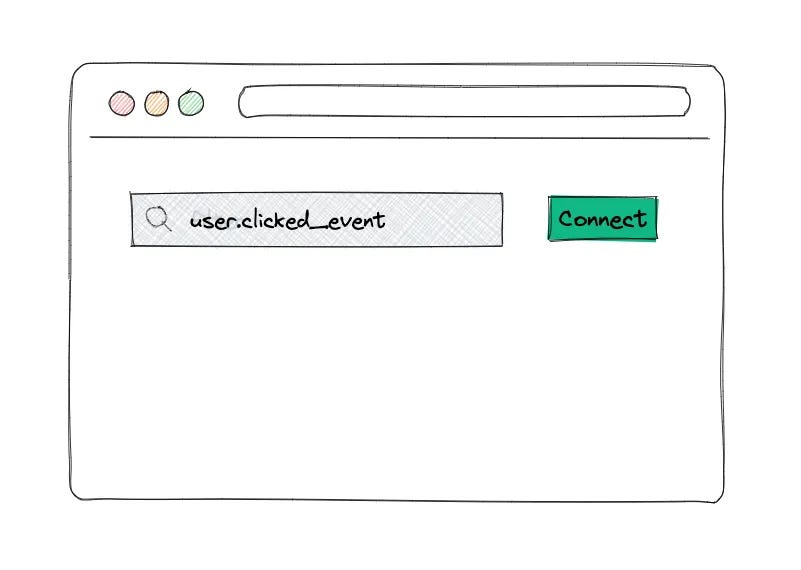
The idea is that once this is done, the UI will automatically display a list of all the click events performed by that user on the Expedia site.
Imagine if every action a user takes on the Expedia site—such as searches, clicks, and bookings—were published to a Kafka topic. This would allow downstream applications to access and utilize this data in real-time.
The browser initiates a full-duplex WebSocket connection with the WebSocket handler application.
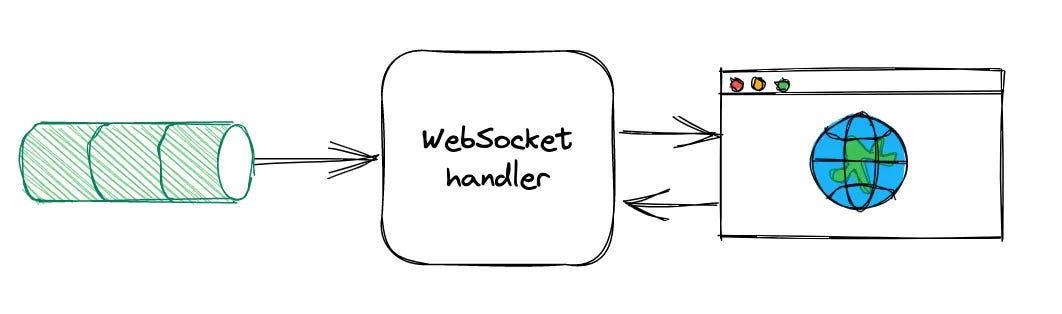
This WebSocket handler takes on the task of consuming messages from Kafka and managing the routing of WebSocket sessions between users. Once the connection is established, the handler subscribes to the specified Kafka topic and begins filtering messages according to the user's search criteria. Any events that match these criteria are then seamlessly sent back to the UI via WebSocket.
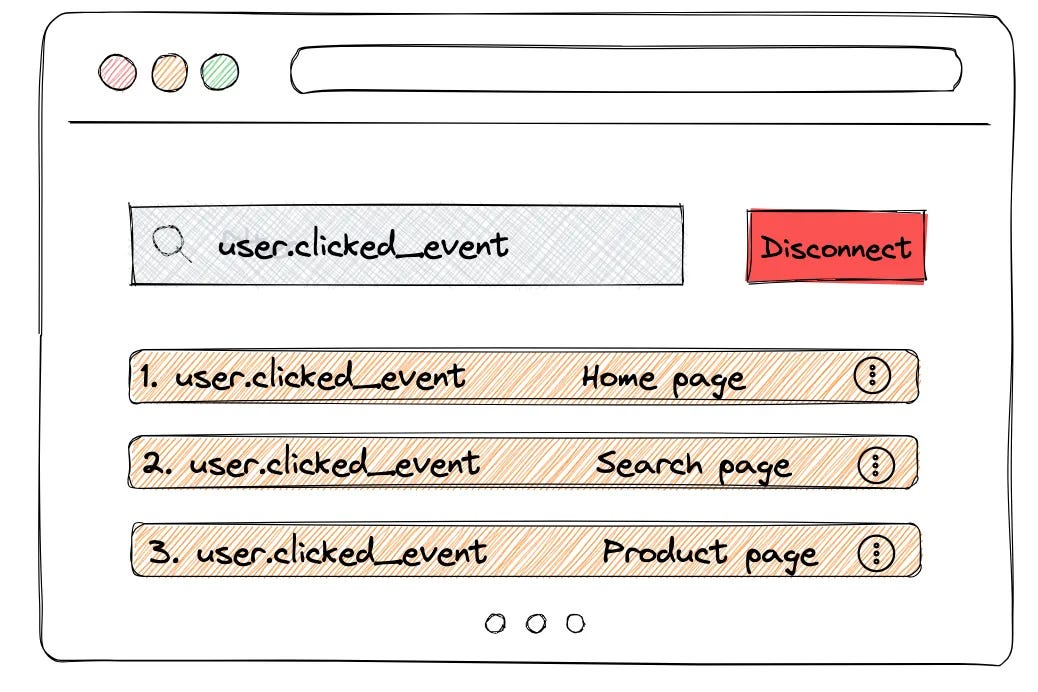
This setup works smoothly under low traffic, but as multiple users continue to browse the Expedia site and generate multiple clicks, the Kafka topic can become flooded with messages. The WebSocket handler may struggle to keep pace with the high volume and rate of messages, leading to delays in processing. This defeats the purpose of delivering near real-time clickstream data, as users might close the Expedia website before the handler has a chance to process and send the data back to the UI.
To solve this problem, one of the first solutions that came to mind is that if the websocket handler is becoming a bottleneck then why can’t add multiple instances of the WebSocket handler across different servers (scaling horizontally). Although it will add complexity, this is a common approach to handle and process large amounts of data.
The limitation arises because a WebSocket connection from a user's browser can only connect to one server instance at a time. If you have multiple server instances (nodes) handling WebSocket connections, each user will be connected to just one of those instances, not all of them.
Let’s say your data is being processed and distributed across multiple servers. If the server instance that a user is connected to hasn’t received certain messages yet (because those messages are on a different server), the user might miss out on seeing some of the real-time data.
This happens because the WebSocket session is only aware of the data that is available on the specific server it is connected to. If the data processing is split among different servers, there’s a chance that not all relevant data is available on the server that a particular WebSocket connection is tied to.
To overcome this limitation, the solution involves separating responsibilities and creating unified data stream:
WebSocket Handler for Sessions: One part of the system focuses exclusively on managing WebSocket connections and routing data to the correct user sessions.
Distributed Processing: To consume the heavily loaded topics in a scalable way, developed a simple Filter worker application deployed in Kubernetes (K8s) that has the responsibility of consuming from multiple heavily loaded Kafka topics using the Kafka-client library and selecting/filtering events.
This filtered data is then sent to a centralized location (e.g., a filtered Kafka topic).
Unified Data Stream: The WebSocket handler then pulls from this centralized, filtered stream, ensuring that each user gets the complete and relevant data, regardless of which server instance they are connected to.
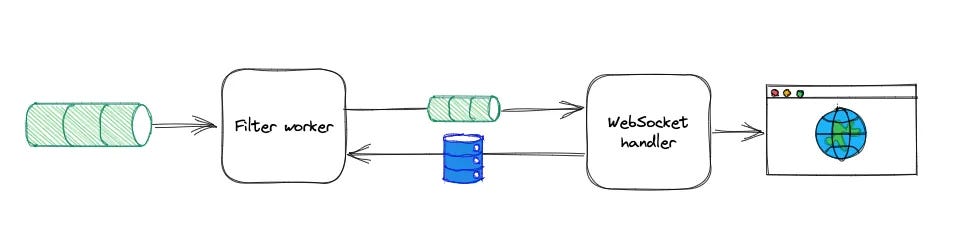
This separation allows the system to scale effectively without users missing out on any part of the data stream, ensuring consistent and accurate real-time updates.
Shared Context and Cache
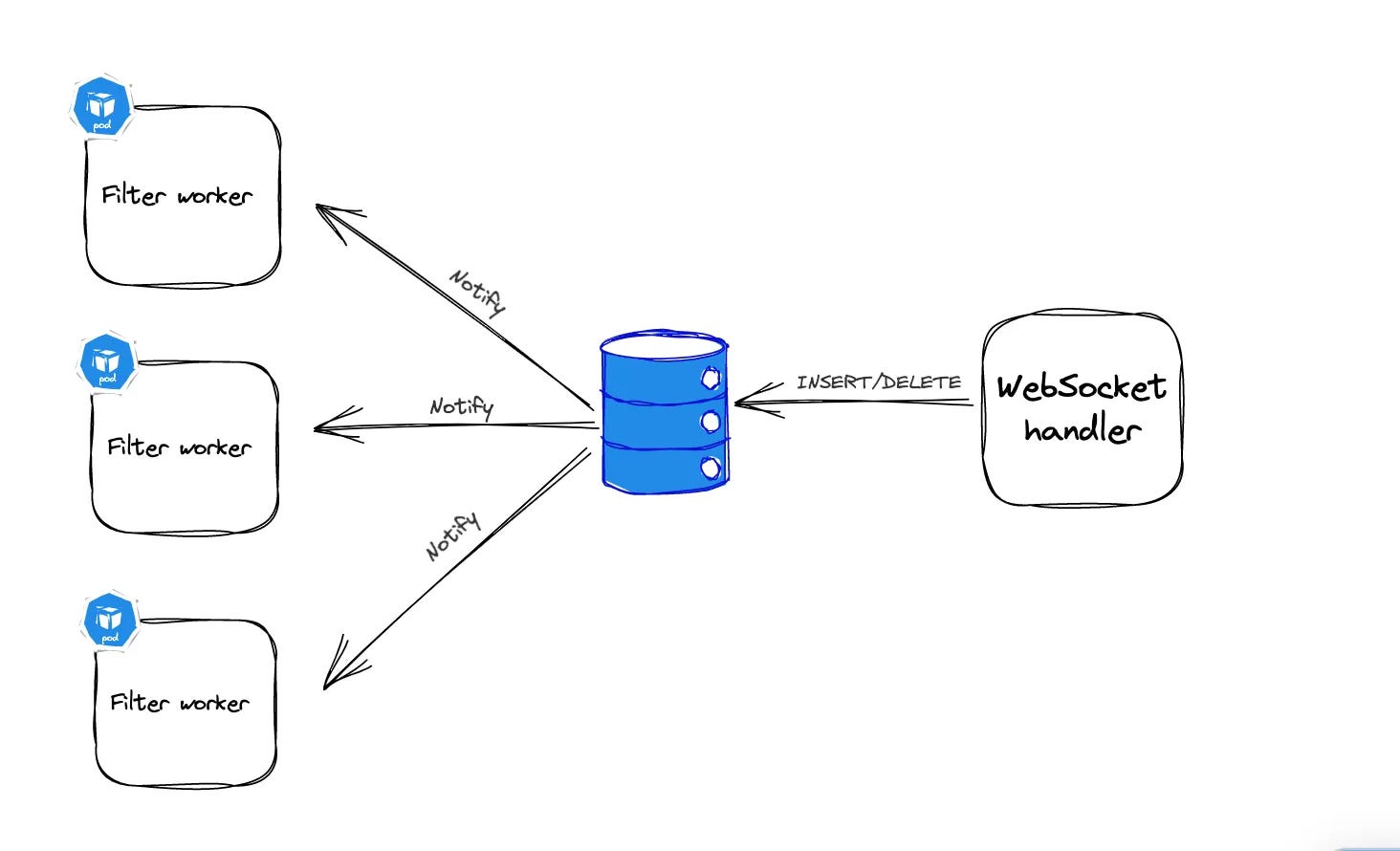
Now how the filter worker knows what should be the criteria on which it will filter the events.To ensure that all consumers (workers) in our system filter data consistently, they need to share the same filtering rules (context). We achieve this by using a shared cache that all workers can access.
Actions with the Cache:
Add a Filter: When a user starts using the tool, the filter criteria are added to the cache.
Remove a Filter: The filter is removed when the user disconnects or after a set time (TTL).
Notify Workers: When filters are added or removed, all workers are notified to update their operations.
PostgreSQL’s LISTEN/NOTIFY feature was used to efficiently manage these cache updates.
When a new entry is added, Postgres pushes notifications out to the client apps listening for notification events. Once our workers have received a notification of an update, that update is cached locally (in-memory). Each filter operation then only needs to access the local cache during processing, and the local cache is updated for every cache update notification.
This setup reduces the need for constant polling, minimizing network and CPU load. When filters are updated, workers are informed and update their local caches accordingly.
Once the events have been filtered, they are placed onto a filtered Kafka topic. This topic contains only the events that users have specifically filtered for, resulting in a much lower volume and rate of messages. By focusing solely on selected events, we can streamline data processing and make the system more efficient.
But how are these events from filtered kafka topics delivered to the right user?
When a user adds filter criteria through the UI, that criteria is stored in the PostgreSQL database with a unique identifier called a filter ID. The filtered Kafka topic is then partitioned by this unique filter ID, corresponding to each WebSocket user session.
When the WebSocket handler reads an event from the filtered Kafka topic, it uses the filter ID to identify which user requested that specific type of event. This process ensures that each user receives only the events that match their specific filters, making the data both personalized and relevant.
As the tool gains popularity and more users connect simultaneously, the system must ensure that filtered data is delivered quickly and accurately, even with 50,000 users online at once. To handle this demand, the system is designed to scale. The WebSocket handler can be replicated across multiple servers or nodes, with each node independently reading the latest events from the filtered Kafka topic and managing WebSocket connections for a subset of users.
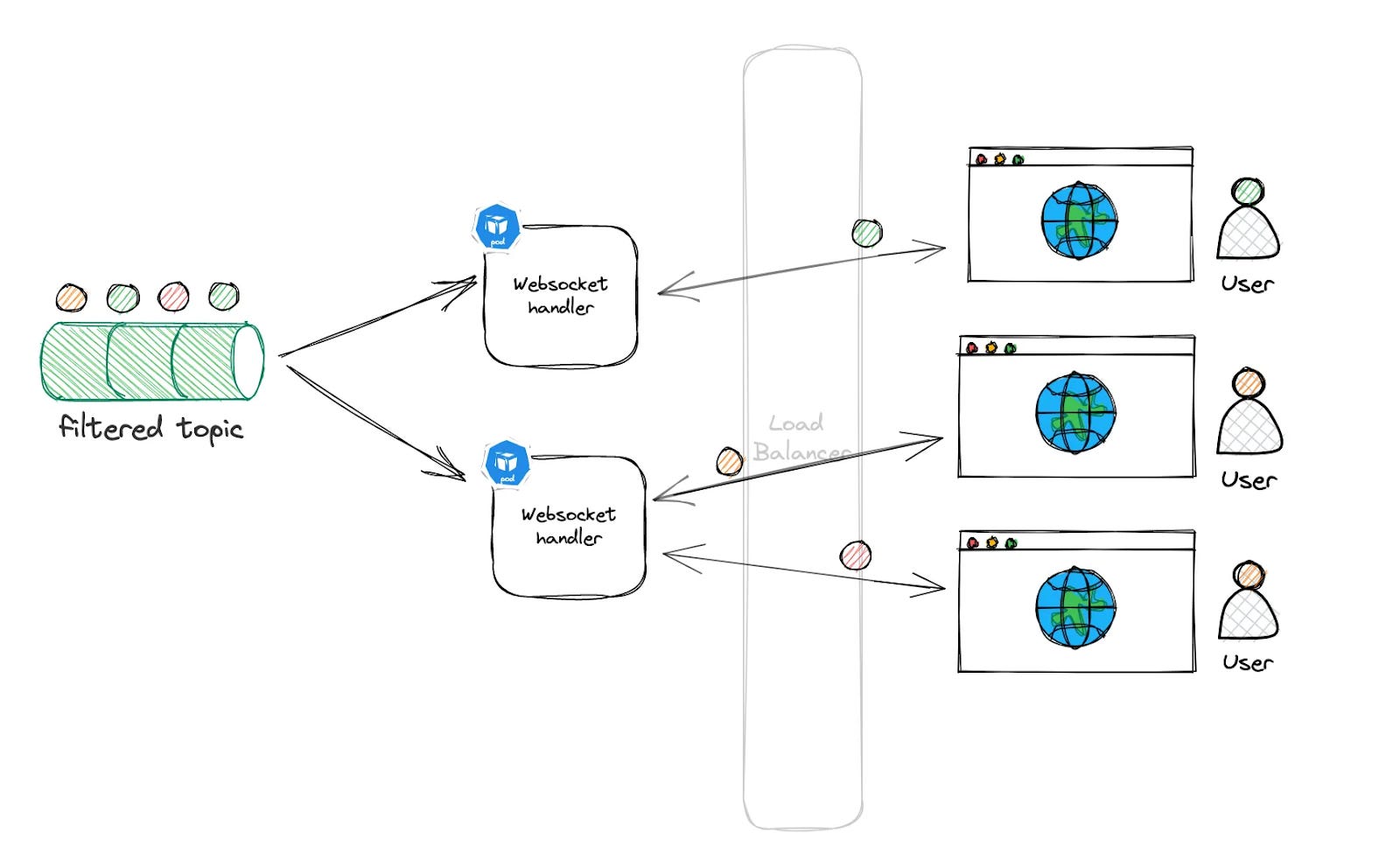
This setup leverages load balancing, efficiently distributing the workload across multiple servers. Regardless of which server a user's browser connects to, that server will have access to the filtered events and can deliver the correct data to the user, ensuring a seamless and responsive experience.
This design exemplifies a classic approach for streaming clickstream data in near real-time, but its applications extend far beyond that. The versatility of this architecture allows it to be adapted for a wide range of use cases.
For instance, after consuming data from the filtered Kafka topic, the system could seamlessly integrate with a recommendation engine. By analyzing user behavior in real-time, the recommendation engine could instantly suggest similar products or services that align with the user’s interests. This would enhance the user experience by providing personalized, timely recommendations that keep users engaged and drive conversions.
Moreover, this design could be extended to other areas such as personalized marketing, where real-time data triggers targeted offers and promotions based on user actions. It could also be used for dynamic content customization, where web or app content is tailored on-the-fly to match a user’s preferences, ensuring a more relevant and engaging experience.
Another potential use case is in predictive analytics, where real-time clickstream data is fed into machine learning models to predict user behavior, allowing businesses to anticipate needs and act proactively. Additionally, this architecture could be leveraged in fraud detection, where real-time monitoring of user activity helps identify and prevent fraudulent behavior before it escalates.
In essence, this design is not just about streaming data—it’s a foundation for building intelligent, responsive systems that adapt to user behavior in real-time, opening up a world of possibilities across various domains.
Source: This article is inspired by the technical insights and innovations shared in Expedia's technical blog.